Switching to Yardstick

Your ATS data comes with you.

Your candidates, jobs, and applications come with you — and you see exactly what the import will do before it does anything.

Leaving an ATS usually means a services project: export requests, spreadsheet archaeology, weeks of back-and-forth, and quiet data loss along the way. Yardstick's importer works differently. You export from your current system, run a dry run, and read a row-by-row preview of exactly what will be created. Nothing is written until you approve that preview — and if you'd rather not do any of it by hand, your coding agent can run the whole migration for you.

What comes with you

The pipeline moves — people, roles, and the history connecting them.

Every ATS holds the same three things you actually care about: the people, the roles, and the history connecting them. The import covers all three.

  • Candidates

    The people in your pipeline, past and present. Once they're in, past candidates can be organized into talent pools so their history keeps working for you.

  • Jobs

    The roles they were attached to.

  • Applications

    Which candidate was in which stage of which job.

When an import is applied, Yardstick creates the people, jobs, and applications from your export, plus the job postings and starter interview plans that give each role a working home — so you land in a system that's ready to run interviews, not an empty shell you still have to wire up. That's the scope: it's the pipeline itself that moves — not your old system's notes, attachments, or interview history.

Two ways to run the move

Run it yourself, or hand it to your agent.

You run it

  1. 1Export from your current ATS. Your current system's export gives you the core records, usually as CSV files.
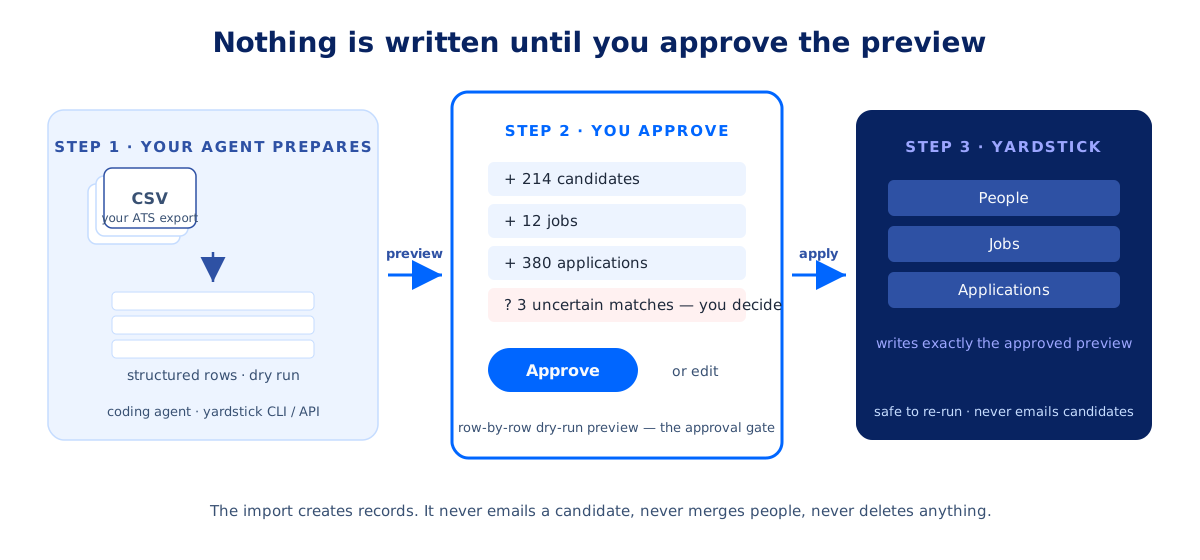
  2. 2Dry-run the import. Send the rows to Yardstick's importer and get back a preview: every person, job, and application it will create, and every match it found against records already in your account.
  3. 3Review and apply. Read the preview, resolve anything ambiguous, and apply it. The apply writes exactly what the preview showed — nothing more.

Your agent runs it

The importer is part of Yardstick's public API and the yardstick CLI — the same surfaces agents already use to operate Yardstick, available on every account. So instead of working through the CSVs yourself, you can hand your exports to a coding agent (Claude Code, Codex, or similar) and ask it to move you in. The agent converts each CSV into structured rows, drives the dry run through the CLI or API, and brings you the preview. You read it and approve; the agent applies it.

That's the same division of labor Yardstick is built on everywhere: agents prepare the work, and humans approve it.

Coming from Greenhouse? Its export arrives as a .zip archive, and the importer has a dedicated path for it — your agent uploads the archive and previews it directly, no CSV wrangling required.

Three-step diagram of a Yardstick ATS import: a coding agent converts CSV exports into structured rows and runs a dry run, you review and approve the row-by-row preview, and the apply step writes exactly the approved records — people, jobs, and applications — into Yardstick.

Built to be predictable

Nothing is written until you approve it.

Migration is where trust in a new system starts, so the importer is built to be predictable in the ways that matter.

The dry run is the contract.

The apply step is pinned to the exact preview you approved. If the preview changes, the apply doesn't run.

No surprise matching.

The only automatic match is an exact candidate email in your own account. Anything fuzzy — a near-duplicate person, an uncertain stage mapping — waits for your explicit decision.

Safe to re-run.

Imports are idempotent: replaying an apply doesn't duplicate your data.

Strictly bounded.

An import creates records. It never emails a candidate, never merges people, never deletes anything.

What you're switching to

The point of moving isn't the move.

It's what your hiring runs on afterward. Yardstick is a structured-interview ATS: job-specific interview plans, consistent interviews, scorecards on every candidate, and AI decision briefs drafted from interview evidence with the hiring team making the calls. And it's built for agents as well as humans — the same API and CLI that import your data let your agent inspect pipelines, prepare actions, and draft updates, always under your approval.

Pricing follows the same no-drama principle as the import: pay-as-you-go for active hiring — no seats, no lock-in.

Weighing a specific move? See how Yardstick compares to Greenhouse, Workable, and Ashby.

FAQ

Common questions about moving to Yardstick.

What data can I import into Yardstick?

Candidates, jobs, and applications — the people in your pipeline, the roles they belong to, and where each person stands in each role. Applying an import also creates job postings and starter interview plans for the imported roles.

Can an AI agent really migrate my ATS data for me?

Yes. The importer is part of Yardstick's public API and the yardstick CLI on every account, so a coding agent can convert your ATS exports into structured rows, run the dry-run, and show you the preview. You approve it; the agent applies it. The agent does the work; the approval stays with you.

What happens to duplicates and uncertain matches?

The importer auto-matches only on an exact candidate email already in your account. Every fuzzy match — a similar name, an unclear pipeline stage — is surfaced in the dry-run preview for you to decide explicitly. Nothing is merged behind your back.

Do I need an engineer to run the import?

No — you need an export. If you can download CSVs from your current ATS, you (or your agent) can dry-run an import and read the preview before applying it.

How long does an ATS migration take?

The work scales with your export, not with a vendor's services queue. As soon as you have your export, you (or your agent) can dry-run the import and read the preview; applying it writes exactly what the preview showed. There's no engagement to schedule and nobody to wait on.

Can the import send emails or change my existing data?

No. An import creates records from your export. It never contacts candidates, never merges existing people, and never deletes anything.