Built-in agents for the hiring work that keeps coming back

Chasing the interviewer who hasn't filed feedback. Reading the overnight applications. Pulling the context together the morning of an interview. None of it is hard. It just never stops arriving, and it lands on the person you would rather have talking to candidates.

Yardstick runs built-in agents that pick that work up. Each one watches for a specific moment in your hiring and does one job when it arrives. Where each one stops is different — and each agent says so before you turn it on.

What each one does

Each agent starts from hiring context you already have in Yardstick — the role, the interview plan, the scorecards, the sessions, the evidence your team has collected. That is why what arrives is about your hiring and not a generic template.

After interviews, while feedback is still outstanding

Chase missing scorecards

A debrief on half the evidence is not a debrief. This agent finds the interviewers who haven't submitted their scorecards and sends them a reminder directly. If feedback is still missing at the final step, the reminder escalates to the hiring manager.

That is the whole scope: reminders to the interviewers who owe feedback, then the hiring manager. It does not contact candidates, edit anyone's feedback, or email people who have opted out.

Overnight, on the applications that came in that day

Screen new applicants nightly

You wake up to yesterday's applications already screened. For applicants who don't match the role, this agent prepares a rejection draft and holds it for review.

Nothing has moved in your pipeline when you sit down: on its own, this agent changes no candidate status and sends no candidate email. You confirm the rejection you agree with, and the draft it already wrote is released into your normal review flow — still unsent, still yours to send.

Ahead of scheduled interview sessions

Prep interview kits for next week's sessions

The half-hour before an interview is usually spent reassembling context someone already had. This agent emails the assigned interviewer their kit: the candidate and role context for that session, the questions to ask, the scorecard anchors to rate against, and the logistics.

It reads your schedule and your candidate records to build that. It does not change either one, and it never emails a candidate.

Once the assigned scorecards for a candidate are complete

Prepare a panel decision brief

Four people interviewed, four scorecards are in, and now someone has to turn that into a decision. This agent synthesizes the completed evidence your panel already recorded into a single brief — one place to start the conversation instead of five tabs, alongside the candidate comparison your team already scores.

The brief is a starting point for review. It does not make the call, and it does not change where the candidate sits in your pipeline. Your panel decides, on the same evidence, in front of them.

When interviewed candidates are still waiting to hear back

Keep candidates informed

The silence after an interview is the part candidates remember. This agent finds the people who interviewed and haven't had an update, and prepares a follow-up draft for that specific candidate.

The draft goes to your team for review. Email Automation still handles everything after that — your templates, your sender, your review and send step, your audit trail.

At a glance

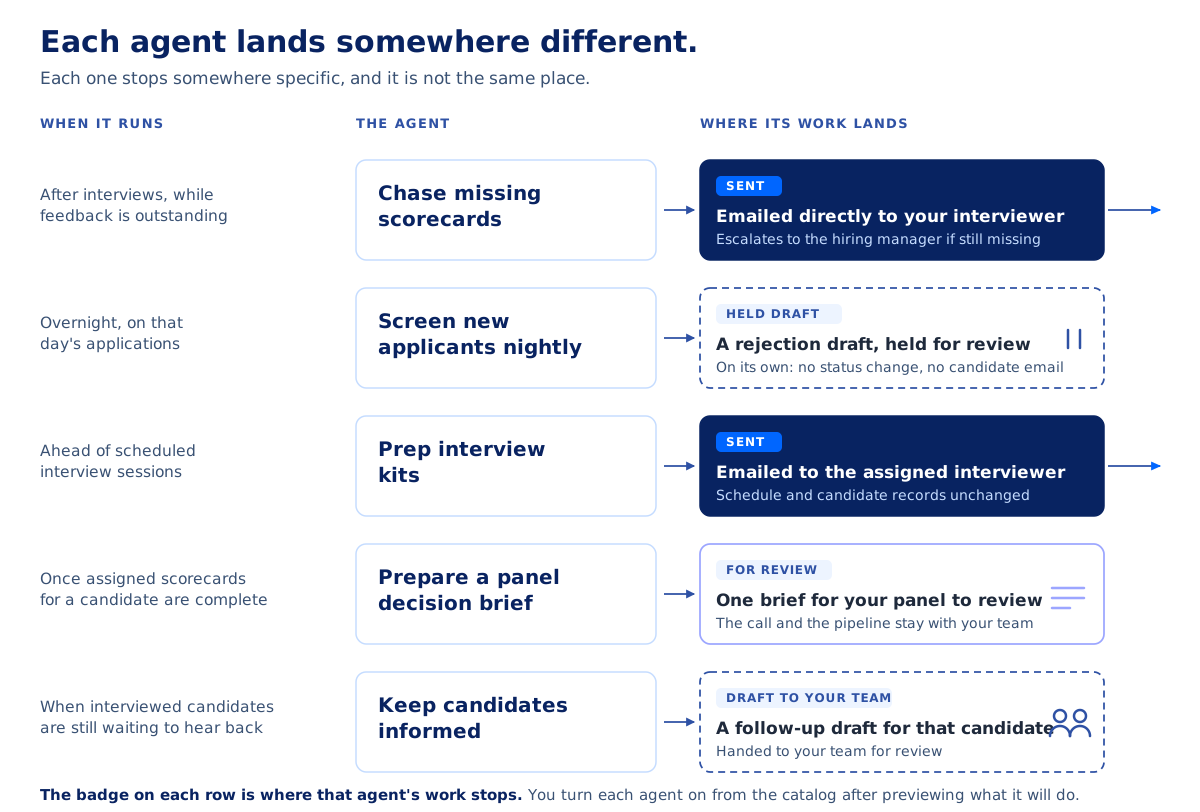
Each agent lands somewhere different.

AgentWhen it runsWhere its work lands
Chase missing scorecardsAfter interviews, while feedback is still outstandingA reminder emailed directly to the interviewer If feedback is still missing at the final step, the reminder escalates to the hiring manager.
Screen new applicants nightlyOvernight, on the applications that came in that dayA rejection draft, held for review On its own, this agent changes no candidate status and sends no candidate email.
Prep interview kits for next week's sessionsAhead of scheduled interview sessionsA kit for the assigned interviewer It leaves your schedule and candidate records unchanged.
Prepare a panel decision briefOnce the assigned scorecards for a candidate are completeOne brief for your panel to review The call and the pipeline stay with your team.
Keep candidates informedWhen interviewed candidates are still waiting to hear backA follow-up draft for that candidate It is handed to your team for review.

You see it before it runs

Pick the agent you want from the catalog, preview exactly what it will do with your hiring data, and confirm. No agent starts working on your account until you turn it on. (In the product, that catalog is still labelled the Recipe catalog.)

That setup step is the same for every agent: you see the scope before you agree to it. What each one does after you confirm is specific to that agent, and it is written on the agent itself.

If you'd rather drive it yourself

None of the agents above ask anything technical of you — you turn one on from the catalog and it runs, whether or not anyone on your team has ever opened a terminal. Some teams want the opposite — to operate the ATS themselves, from the tools they already work in. Yardstick is agent-operable too — your own coding agent can run the yardstick CLI, or a general assistant can connect over MCP, and drive hiring workflows under your approval.

That is the same category, from the other direction — one agent you bring and direct on demand, and the built-in ones Yardstick hosts, keeps on, and you configure. If that is your setup, the agent-operable ATS is the page you want.

Questions

What do Yardstick's built-in agents do?

Each built-in agent handles one recurring job: chasing missing scorecards, screening new applicants nightly, prepping interview kits for upcoming sessions, preparing a panel decision brief once scorecards are complete, and preparing follow-up drafts for candidates still waiting to hear back.

Do Yardstick's agents email candidates automatically?

The answer differs by agent. The nightly applicant screener prepares rejection drafts and holds them for review: on its own it changes no candidate status and sends no candidate email, and once you confirm a rejection, the draft it wrote is released into your normal review flow still unsent. The keep-candidates-informed agent prepares a follow-up draft for that candidate and hands it to your team for review; Email Automation still handles templates, sender, review and send, and the audit trail. The scorecard chaser does send email directly — to the interviewers who owe feedback, escalating to the hiring manager — and it never contacts candidates. The interview-kit agent's work lands with the assigned interviewer, and the decision-brief agent's lands with your panel.

How do I turn on a built-in agent?

Choose it from the catalog, preview exactly what it will do with your hiring data, and confirm. Nothing runs until you do.

What's the difference between Yardstick's built-in agents and using my own agent?

The built-in agents are hosted by Yardstick, kept on once you turn them on, and each does one named job on a specific trigger — each with its own destination, stated on the agent. Your own agent — a coding agent on the yardstick CLI, or an assistant connected over MCP — is general purpose, runs when you ask it, and does what you direct within the public API and your approval gates.

Start with the work that keeps slipping

You don't have to turn them all on. Pick the one thing that slips most often in your process and turn on the agent that covers it — if debriefs stall waiting on feedback, start with the scorecard chaser — and see what a week looks like when nobody has to remember it.